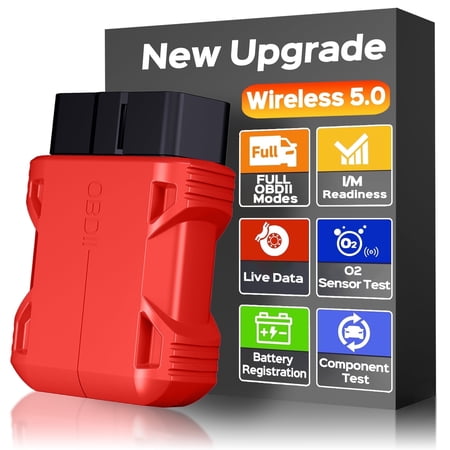
The OBD2 bluetooth scanner is an on-board intelligent vehicle diagnostic tool designed for everyday drivers, DIY car owners, and basic vehicle troubleshooting. Based on Bluetooth communication, this compact obd2 scanner works with the exclusive APP client with No Subscription Fee, allowing users to check vehicle fault information, read vehicle data, and review basic performance status through a compatible mobile device.As a practical obd2 scanner diagnostic tool, it helps users read diagnostic trouble codes, view vehicle data, check I/M readiness, access live data, and perform supported OBDII functions on compatible vehicles. This scanner for car diagnostics is plug and play, with no binding or personal information required, making it simple for daily use, road trips, used car checks, and home garage maintenance.Designed as a portable code reader for cars and trucks, this car scanner is compatible with vehicles that support OBDII standard 9 protocols. Whether you need a compact scan tool for check engine light diagnostics or a useful option in the code readers & scan tools category, the Tidymend OBDII scanner provides a convenient way to better understand basic vehicle conditions before visiting a repair shop. Specification: Name: Bluetooth OBD2 Scanner for Cars Communication mode: Bluetooth 5.0 Main control chips: BAT32G137GH48FA,LQFP48. Working voltage: DC 9V~16V Working current: 28mA~42mA Standby current: 25mA Operating environment:-20 ~ 60℃ Storage temperature:-20 ~ 60℃ Supported systems: iOS, Android, Windows. Product weight: 29g/0.06lbs OBD2 Bluetooth Scanner Function: 1. Fault code Read the car's current fault code information 2. Clear the fault code. After the fault is cleared, the car engine failure light is off. If the light is not off, the engine can be turned off and cleared when the power is on. 3. Vehicle information Read the car frame number and other information. 4. Data flow Read the current real-time data flow information of the car. 5. Battery voltage reading Diagnose the working voltage of automotive batteries. 6. Monitor the test Read the monitoring data after the DTC is cleared. 7. Freeze the frame Frozen data when the car has a fault code 8. Performance test. Test vehicle acceleration performance, braking performance, distance performance. 9.MIL Status Diagnostic car MIL fault indicator light related data. Supported protocols: SAE J1850 PWM(41.6 Kbaud) SAE J1850 VPW(10.4 Kbaud) ISO 9141-2(5 baud init,10.4 Kbaud) ISO 14230-4 KWP(5 baud init,10.4 Kbaud) ISO 14230-4 KWP(fast init,10.4 Kbaud) ISO 15765-4 CAN(11bit ID,500 Kbaud) ISO 15765-4 CAN(29bit ID,500 Kbaud) ISO 15765-4 CAN(11bit ID,2500 Kbaud) ISO 15765-4 CAN(29bit ID,250 Kbaud) How to download the exclusive APP? The OBD2 scanner is compatible with both iOS and Android devices: 1. Apple users search for "Mini ODBII" in the "App Store" 2. Android users search for "Mini ODBII" in the "Google Play Store" How to connect the device? 1. Automatic connection After the OBD2 scanner is inserted into the car, turn on the Bluetooth of the mobile phone, start the vehicle, the scanner will automatically pair, and the connection can be successful without any other operation. 2. Manual connection If you cannot automatically connect successfully, open the APP, select the upper left corner , select "Connection settings", find "Bluetooth LE", and click to connect. Exception solution Q: Why can't the engine fault be cleared A: You can try to turn off the engine and clear it when it is powered on Q: Failed to connect to the device A: 1. Please confirm whether the vehicle has started 2. Check whether the mobile phone Bluetooth is enabled 3. Check whether the location information permission is allowed Q: Scanning the QR code can not download A: You need to use the mobile browser to scan and download Q: What car is not supported A: 24V diesel vehicles, new energy, hybrid and do not meet the OBDII agreement models are not supported
The OBD2 bluetooth scanner is an on-board intelligent vehicle diagnostic tool designed for everyday drivers, DIY car owners, and basic vehicle troubleshooting. Based on Bluetooth communication, this compact obd2 scanner works with the exclusive APP client with No Subscription Fee, allowing users to check vehicle fault information, read vehicle data, and review basic performance status through a compatible mobile device.As a practical obd2 scanner diagnostic tool, it helps users read diagnostic trouble codes, view vehicle data, check I/M readiness, access live data, and perform supported OBDII functions on compatible vehicles. This scanner for car diagnostics is plug and play, with no binding or personal information required, making it simple for daily use, road trips, used car checks, and home garage maintenance.Designed as a portable code reader for cars and trucks, this car scanner is compatible with vehicles that support OBDII standard 9 protocols. Whether you need a compact scan tool for check engine light diagnostics or a useful option in the code readers & scan tools category, the Tidymend OBDII scanner provides a convenient way to better understand basic vehicle conditions before visiting a repair shop. Specification: Name: Bluetooth OBD2 Scanner for Cars Communication mode: Bluetooth 5.0 Main control chips: BAT32G137GH48FA,LQFP48. Working voltage: DC 9V~16V Working current: 28mA~42mA Standby current: 25mA Operating environment:-20 ~ 60℃ Storage temperature:-20 ~ 60℃ Supported systems: iOS, Android, Windows. Product weight: 29g/0.06lbs OBD2 Bluetooth Scanner Function: 1. Fault code Read the car's current fault code information 2. Clear the fault code. After the fault is cleared, the car engine failure light is off. If the light is not off, the engine can be turned off and cleared when the power is on. 3. Vehicle information Read the car frame number and other information. 4. Data flow Read the current real-time data flow information of the car. 5. Battery voltage reading Diagnose the working voltage of automotive batteries. 6. Monitor the test Read the monitoring data after the DTC is cleared. 7. Freeze the frame Frozen data when the car has a fault code 8. Performance test. Test vehicle acceleration performance, braking performance, distance performance. 9.MIL Status Diagnostic car MIL fault indicator light related data. Supported protocols: SAE J1850 PWM(41.6 Kbaud) SAE J1850 VPW(10.4 Kbaud) ISO 9141-2(5 baud init,10.4 Kbaud) ISO 14230-4 KWP(5 baud init,10.4 Kbaud) ISO 14230-4 KWP(fast init,10.4 Kbaud) ISO 15765-4 CAN(11bit ID,500 Kbaud) ISO 15765-4 CAN(29bit ID,500 Kbaud) ISO 15765-4 CAN(11bit ID,2500 Kbaud) ISO 15765-4 CAN(29bit ID,250 Kbaud) How to download the exclusive APP? The OBD2 scanner is compatible with both iOS and Android devices: 1. Apple users search for "Mini ODBII" in the "App Store" 2. Android users search for "Mini ODBII" in the "Google Play Store" How to connect the device? 1. Automatic connection After the OBD2 scanner is inserted into the car, turn on the Bluetooth of the mobile phone, start the vehicle, the scanner will automatically pair, and the connection can be successful without any other operation. 2. Manual connection If you cannot automatically connect successfully, open the APP, select the upper left corner , select "Connection settings", find "Bluetooth LE", and click to connect. Exception solution Q: Why can't the engine fault be cleared A: You can try to turn off the engine and clear it when it is powered on Q: Failed to connect to the device A: 1. Please confirm whether the vehicle has started 2. Check whether the mobile phone Bluetooth is enabled 3. Check whether the location information permission is allowed Q: Scanning the QR code can not download A: You need to use the mobile browser to scan and download Q: What car is not supported A: 24V diesel vehicles, new energy, hybrid and do not meet the OBDII agreement models are not supported