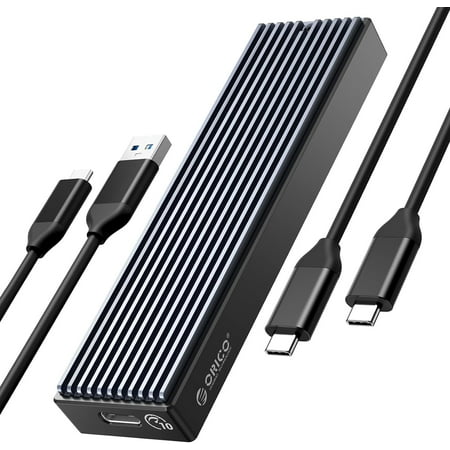
Dear customer, if you have any questions after receiving the goods, please feel free to contact us. We will reply to you as soon as possible within 24 hours and we will be happy to serve you. 📢Notice Before Use: 1. M.2 SSD is not included. 2. The new hard drive needs to be formatted before use. 3. Heating during use is a normal phenomenon and does not affect normal use. 4. This product is also compatible with mobile phones and tablets, but please ensure that your device supports OTG. 5. SATA models do not include thermal pads. ORICO External NVMe Enclosure Aluminum M.2 SSD Adapter Solid State Drives Case 4TB ORICO M.2 NVME SSD enclosure that support USB3.2 10Gbps speed.External M.2 enclosure equipped with the latest USB3.1 Gen2x2 master chip, and can support up to 1 0Gbps transmission bandwidth.The M.2 enclosure shell uses ABS + double aluminum alloy heat sink design. A silent cooling fan is installed inside to improve the heat dissipation effect and excellent heat dissipation performance.Compatible with four different specifications of M.2 NVME 2230,2242,2260,2280 SSD, up to 2000 MB / s transmission rate.4TB SSD external hard drive enclosure case (maximum) support windows / Linux / Mac OS etc roduct Name: ORICO M .2 NVMe SSD Enclosure Product Model: ORICO-M2PVC3-G20 Material: Aluminum Alloy+ABS Dimensions: 11.5*3.95*2.25 Output Interface: USB3.2 GEN2 x 2 Type-C Speed: 20Gbps Cable: USB Type-C to Type-C, 0.15m, USB Type-A to Type-C, 0.15m Support Capacity: 2TB Max Installation: Screw Package Contents: 1. 20Gbps NVME Case 2. Silicone heating pad 3. Screwdriver 4. Screw 5. 15cm C-to-A cable 6. 15cm C-to-C cable 7. User Manual Wonder: 1. Why can't the computer detect the hard drive case? Newly purchased hard drives must be formatted before use. (1) Right click on this computer and select "Manage". (2) Click to enter Disk Management. (3) Right-click on "Initialize", select "MBR" (hard disk capacity is less than or equal to 2TB),or select "GPT" (hard disk capacity is greater than 2TB) , then select "New Simple Volume". (4) Finally, select the option to perform quick formatting and click "OK". 2. Why is the actual transmission speed not as fast as advertised? The transmission speed is limited by hard disk itself, hard disk enclosure, data cables, and connected devices. (For example, if a 10Gbps hard disk enclosure is connected to a computer interface that only supports 5Gbps, it can only achieve a speed of 5Gbps. )Therefore, if you feel that the speed is too slow, please replace the hard disk, data cable, or computer.
Dear customer, if you have any questions after receiving the goods, please feel free to contact us. We will reply to you as soon as possible within 24 hours and we will be happy to serve you. 📢Notice Before Use: 1. M.2 SSD is not included. 2. The new hard drive needs to be formatted before use. 3. Heating during use is a normal phenomenon and does not affect normal use. 4. This product is also compatible with mobile phones and tablets, but please ensure that your device supports OTG. 5. SATA models do not include thermal pads. ORICO External NVMe Enclosure Aluminum M.2 SSD Adapter Solid State Drives Case 4TB ORICO M.2 NVME SSD enclosure that support USB3.2 10Gbps speed.External M.2 enclosure equipped with the latest USB3.1 Gen2x2 master chip, and can support up to 1 0Gbps transmission bandwidth.The M.2 enclosure shell uses ABS + double aluminum alloy heat sink design. A silent cooling fan is installed inside to improve the heat dissipation effect and excellent heat dissipation performance.Compatible with four different specifications of M.2 NVME 2230,2242,2260,2280 SSD, up to 2000 MB / s transmission rate.4TB SSD external hard drive enclosure case (maximum) support windows / Linux / Mac OS etc roduct Name: ORICO M .2 NVMe SSD Enclosure Product Model: ORICO-M2PVC3-G20 Material: Aluminum Alloy+ABS Dimensions: 11.5*3.95*2.25 Output Interface: USB3.2 GEN2 x 2 Type-C Speed: 20Gbps Cable: USB Type-C to Type-C, 0.15m, USB Type-A to Type-C, 0.15m Support Capacity: 2TB Max Installation: Screw Package Contents: 1. 20Gbps NVME Case 2. Silicone heating pad 3. Screwdriver 4. Screw 5. 15cm C-to-A cable 6. 15cm C-to-C cable 7. User Manual Wonder: 1. Why can't the computer detect the hard drive case? Newly purchased hard drives must be formatted before use. (1) Right click on this computer and select "Manage". (2) Click to enter Disk Management. (3) Right-click on "Initialize", select "MBR" (hard disk capacity is less than or equal to 2TB),or select "GPT" (hard disk capacity is greater than 2TB) , then select "New Simple Volume". (4) Finally, select the option to perform quick formatting and click "OK". 2. Why is the actual transmission speed not as fast as advertised? The transmission speed is limited by hard disk itself, hard disk enclosure, data cables, and connected devices. (For example, if a 10Gbps hard disk enclosure is connected to a computer interface that only supports 5Gbps, it can only achieve a speed of 5Gbps. )Therefore, if you feel that the speed is too slow, please replace the hard disk, data cable, or computer.