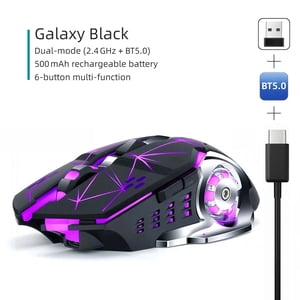
2.4G Silent Rechargeable Wireless Mouse Optical USB Computer Mouse Note 1. It's out of power if the mouse cursor moves slowly or stop moving. 2. The blue light beside the scroll wheel will be on while charging, and then goes off when the mouse is fully charged. 3. The mouse side buttons are not available for Mac OS as some functions of Mac OS are not open to public. How to use 1. Charge the mouse for about 2 hours before using it for the first time. 2. Take the dongle out, which is stored in the back of mouse. Insert the dongle into the USB port of your PC. 3. Turn on the mouse, the switch is at the bottom of the mouse. 4. Allow a few seconds for installing, no action needed, just wait. Then you can use the mouse. Package Contents 1*Wireless mouse 1*battery(built-in) 1*USB receiver(stored in the bottom of mouse) 1*USB charging cable 1*English manual
2.4G Silent Rechargeable Wireless Mouse Optical USB Computer Mouse Note 1. It's out of power if the mouse cursor moves slowly or stop moving. 2. The blue light beside the scroll wheel will be on while charging, and then goes off when the mouse is fully charged. 3. The mouse side buttons are not available for Mac OS as some functions of Mac OS are not open to public. How to use 1. Charge the mouse for about 2 hours before using it for the first time. 2. Take the dongle out, which is stored in the back of mouse. Insert the dongle into the USB port of your PC. 3. Turn on the mouse, the switch is at the bottom of the mouse. 4. Allow a few seconds for installing, no action needed, just wait. Then you can use the mouse. Package Contents 1*Wireless mouse 1*battery(built-in) 1*USB receiver(stored in the bottom of mouse) 1*USB charging cable 1*English manual